
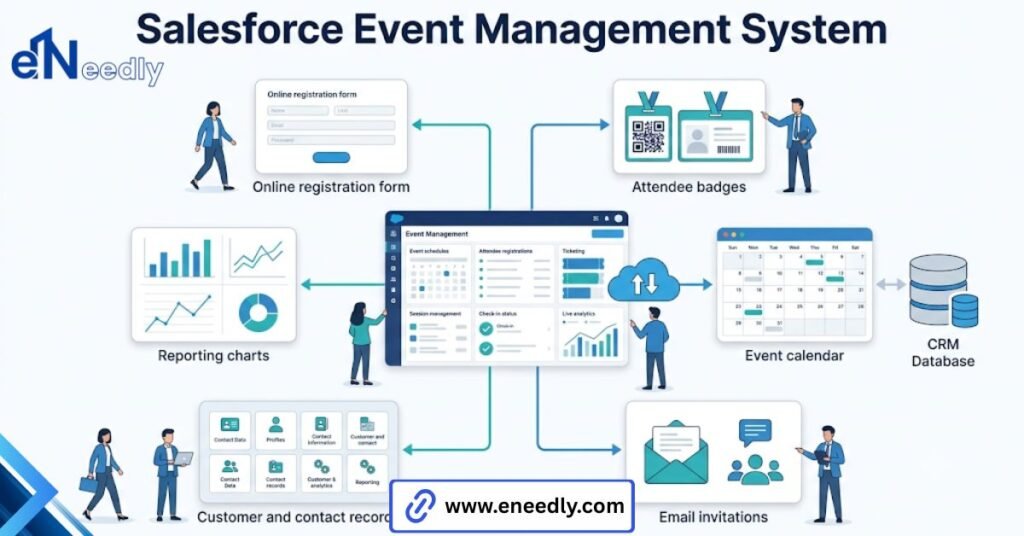
Salesforce event management system is the practice of tracking events, registrants, and attendance inside Salesforce using Campaigns and related records. Native Salesforce covers campaign tracking and reporting, while registration pages and check-ins usually require an added app.
Businesses use it to connect event activity directly to leads, contacts, and campaign return on investment. A marketing ops lead spins up a new Campaign in Salesforce for next month’s webinar, confident the platform has this handled. Then the registration pages come up.
Then check in. Then, a way to tell who actually attended versus who just signed up. None of that lives inside a standard Campaign record.
That is not a flaw exactly. Salesforce was not built as an event platform. It was built as a CRM with campaign tracking, and event management gets layered on top of that foundation, sometimes cleanly, sometimes messily.
This guide walks through what Salesforce actually gives you for events, where the gaps sit, and what a properly configured setup looks like once someone has done the work of closing them.
What Salesforce Event Management Actually Includes Out Of The Box
Native Salesforce gives you Campaigns, Campaign Members, and standard reporting tied to both. That covers tracking who is associated with an event and reporting on outcomes tied to that association.
It does not include a registration page builder. It does not include a check-in tool. It does not include an agenda or session builder. Those pieces, the parts attendees actually interact with, sit outside what Salesforce ships natively.
This gap surprises more teams than it should. Salesforce has built-in event management, in the sense that it can track and report on events. It does not have built-in event management in the sense of running the actual event experience.
Consider a simple internal training day versus a public conference. The training day can often run entirely on native Salesforce, a Campaign, a manually maintained list of Campaign Members, and a spreadsheet for check-in.
The public conference cannot. Registration volume, payment collection, and a real check-in flow all push past what Campaigns alone were designed to handle. Understanding which situation you are actually in, before assuming either extreme, saves a lot of wasted setup time later.
Salesforce Campaigns As The Backbone Of Event Management
Every serious approach to Salesforce event management starts with Campaigns, because that is the object everything else connects back to for reporting. A Campaign represents the event itself.
Campaign Members represent each person associated with it, tagged with a status: sent, responded, or, in event terms, registered, attended, or no show.
Those default statuses are generic on purpose, since Campaigns exist for far more than events. Left unconfigured, a webinar and a field marketing event both get tracked with the same status set, which flattens reporting that should actually look different across event types.
Customizing Campaign statuses per event type, before the first event runs rather than after several have already piled up, is a small setup step that pays off every time someone pulls a report later.
Parent and child Campaign structures matter for anything spanning multiple days or multiple locations.
A three-day conference with separate tracks benefits from a parent Campaign rolling up child Campaigns for each track, so leadership can see aggregate numbers while individual teams still get granular data for their piece of the event.
Skipping that hierarchy usually means someone stitching together numbers manually after the fact, pulling multiple reports and combining them by hand instead of looking at one rolled-up view.
Managing Leads And Contacts Through An Event In Salesforce
Every registrant needs to become something in Salesforce: a new lead, a new contact, or a match to an existing record. This decision happens automatically in a properly configured setup and manually or not at all in a poorly configured one.
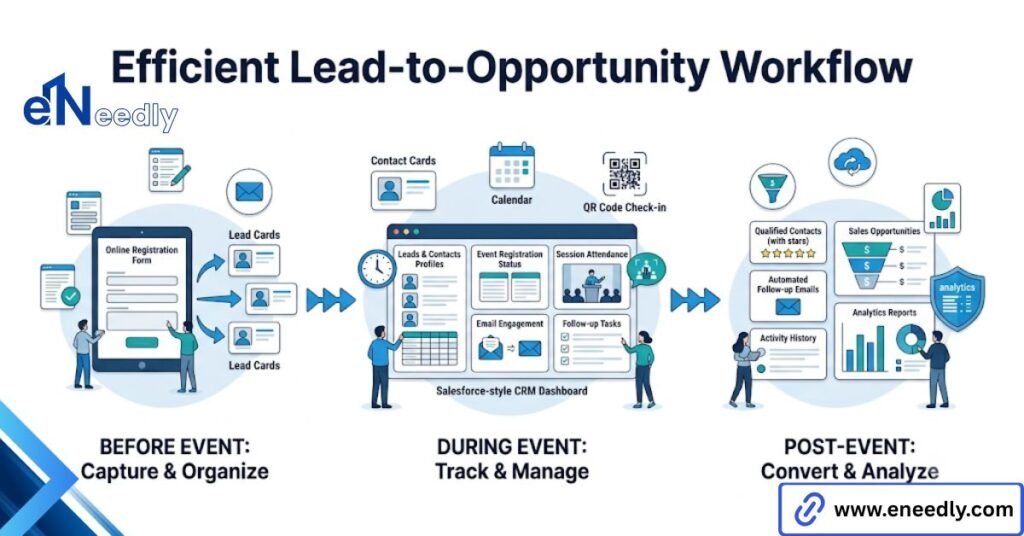
New registrants with no existing record typically become leads, tracked through a standard or custom qualification process afterward. Returning contacts, people already in the system, should update their existing record rather than spawn a duplicate.
Campaign Member records link back to whichever lead or contact record was created or matched, which is what lets a report later answer a genuinely useful question.
Who attended this event, and what happened to them afterward? Lead conversion adds another layer worth planning for.
A lead who attends an event and later becomes a qualified opportunity needs that Campaign association to survive the conversion process, since converting a lead to a contact in Salesforce does not automatically preserve every piece of campaign history unless it is configured to do so.
Without a naming convention across campaigns, that link becomes hard to use at scale. A campaign list with a year of loosely named events turns into something nobody can search confidently.
Where Native Tools Stop And AppExchange Apps Start
Teams often assume Salesforce has a built-in event registration and check-in tool, given how much else the platform handles.
It does not, and that assumption tends to surface midway through a project, right when someone needs a registration page live. At that point, the choice is to build or buy.
Building means custom objects, a registration page built through a website or landing page tool, and manual or custom automated syncing back to Campaign Members. Buying means an AppExchange app that already handles registration, check-in, and the sync layer.
What Building Custom Actually Requires
A custom build needs, at minimum, a registration form, a way to write that submission back to Salesforce, and logic handling duplicate matching and Campaign Member status updates. None of that is exotic on its own, but together it becomes a small ongoing system someone has to own.
Check-in for a custom build usually means a manually maintained list or a lightweight scanning tool built separately, since Salesforce itself has no native badge scanning capability. That piece alone often becomes the reason teams reconsider building from scratch.
What An AppExchange App Typically Includes
Most dedicated event apps bundle registration pages, payment processing where relevant, a badge, and a sync layer back to Campaigns that handles status updates automatically.
The tradeoff is a recurring subscription cost and less control over the exact data model. Some apps sync in near real time. Other apps sync on a schedule, so checking that detail during evaluation matters more than the feature list alone suggests.
Custom objects and manual builds give a team complete control over the data model, exactly the fields and structure they want. That control comes with an ongoing cost.
Someone inside the organization now owns maintaining that build indefinitely, a job an AppExchange app would otherwise absorb as part of what you are paying for. There is no universally right answer between the two.
A team with strong internal Salesforce admin resources and unusual data needs may prefer the custom build. A team without that capacity is usually better served by an app built for this specific problem.
A custom build looks cheaper on paper because there is no subscription fee, but the internal time spent maintaining field mapping, fixing sync issues, and updating the registration form as needs change is a real cost that just does not show up on an invoice.
An AppExchange app, by contrast, bundles that maintenance into what you are paying for. Evaluating the two fairly means pricing out internal admin time for the custom route, not just comparing a subscription cost against zero.
How To Manage Events In Salesforce, Step By Step
- Create the Campaign first, before any registration page exists, using a consistent naming convention that includes event type and date.
- Customize Campaign Member statuses for the specific event type, distinguishing at a minimum between registered, attended, and no-show.
- Connect the registration source, whether a landing page tool, an AppExchange event app, or a custom-built form, so new sign-ups create or update Campaign Members automatically.
- Configure duplicate matching so that returning contacts update existing records instead of creating new ones.
- Set up check-in tracking through the event app or a manual process, so Campaign Member status reflects real attendance, not just registration.
- Assign lead routing rules ahead of the event, so new registrants land with the right owner the moment they are created, not days later.
- Build the report or dashboard before the event, not after, so return on investment reporting is ready the moment the event ends.
Skipping step two is the most common shortcut, and it is the one that causes the most reporting frustration months later. Skipping step six is a close second, since new leads sitting unassigned for days often mean a slower follow-up than the event justified.
Automation And Reporting For Salesforce Event Management
Automation inside this workflow usually handles three things: updating Campaign Member status based on triggers, routing new leads to the right owner, and sending internal notifications when someone with a high-value profile registers.
None of that automation matters much if the underlying data feeding it is inconsistent. Automation built on top of messy Campaign statuses just produces messy results faster.
Teams running Pardot or Marketing Cloud alongside Salesforce add another sync layer worth mapping out early.
Event registration often needs to update both the marketing automation platform and Salesforce, and those two systems do not always stay in perfect agreement without deliberate configuration.
Reporting is where the payoff shows up, assuming the setup work happened first. A clean Campaign structure lets a team report on cost per registrant and pipeline generated per event, broken out by event type rather than lumped into one undifferentiated bucket.
The reporting everyone actually wants, real event return on investment, only works if Campaign Member status reflects true attendance rather than just registration.
Most organizations never bother closing that gap, then wonder why their event reporting always looks softer than it should. Dashboards built once and left alone tend to drift out of usefulness as event types change.
A dashboard built for a single webinar series often breaks down once a field event or a multi-track conference enters the mix, since the underlying report filters were never built to handle more than one shape of event.
Revisiting reports every few events, not just at initial setup, keeps them matching what the organization is actually running rather than what it was running a year earlier.
Salesforce Event Management Best Practices
A short list, deliberately, because most of what matters here comes down to a handful of decisions made early rather than a long checklist.
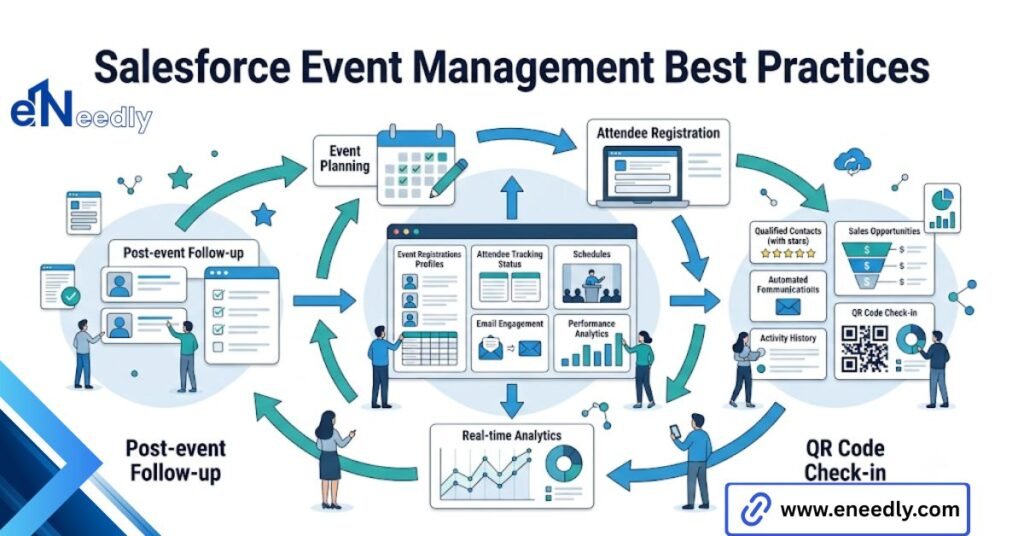
- Set a campaign naming convention before running more than one event, covering event type, date, and region if relevant.
- Customize Campaign Member statuses per event type instead of relying on the generic default set.
- Decide on build versus buy for registration and check-in before a launch date is looming.
- Configure duplicate matching rules before the first registration comes in, not after cleanup is already needed.
- Tie check-in data to Campaign Member status, since registration alone tells you almost nothing about actual event value.
- Set lead routing rules ahead of the event so new registrants reach an owner quickly instead of sitting unassigned.
- Use parent and child Campaigns for multi-day or multi-track events, so reporting rolls up without manual work.
None of these is complicated individually. Skipped together, they are exactly why so many Salesforce instances end up with a campaign list nobody trusts and a reporting process that takes longer than the event itself to untangle.
How eNeedly Helps Teams Get More Out of Salesforce for Events
Plenty of teams already own Salesforce and are paying for capabilities they are not using well, rather than needing an entirely new platform. That gap is usually the first thing worth checking before adding another tool to the stack.
eNeedly, with more than eight years of experience evaluating and implementing this kind of software, often starts by reviewing how a team’s existing Salesforce setup handles Campaigns, statuses, and duplicate matching before recommending an AppExchange app.
That review typically covers current campaign naming, whether Campaign Member statuses reflect how leads from past events were routed and followed up on, since patterns from previous events usually predict where the next one will run into the same friction.
In some cases, the fix is a properly configured Campaign structure and a naming convention nobody had set. In others, a genuine gap exists that calls for a dedicated event app or a custom integration. Knowing which situation you are actually in is most of the value.
Frequently Asked Questions
Does Salesforce have a built-in event management tool?
Not a full one. Salesforce natively provides Campaigns and Campaign Members for tracking and reporting, but registration pages, check-in, and agenda tools require an AppExchange app or a custom build.
What is the difference between a lead and a contact in Salesforce event management?
A lead is typically a new person with no existing relationship to the organization. A contact already exists in the system, often tied to an account, and event registration should update that record rather than duplicate it.
How do I track event attendance versus registration in Salesforce?
Customize Campaign Member statuses to distinguish registered from attended, then update that status based on actual check-in data rather than leaving every registrant marked the same way by default.
Do I need an AppExchange app for Salesforce event management?
Not always. Simple internal events can run on Campaigns alone with a manual or lightly automated registration process. Larger or public-facing events usually benefit from a dedicated app handling registration and check-in.
How do I stop duplicate contacts from Salesforce event registrations?
Set duplicate matching rules, generally based on email, before your first event registration comes in. Without this, returning attendees frequently create a second record instead of updating their existing one.
Can Salesforce report on event return on investment?
Yes, if Campaign data is set up correctly. Reporting on cost per attendee and pipeline generated depends on accurate Campaign Member statuses reflecting real attendance, not just registration counts.
Does lead conversion preserve Campaign history in Salesforce?
Not automatically in every configuration. Converting a lead to a contact and opportunity can lose the original Campaign association unless the org is set up to carry that history through conversion.