
Quick Answer: Cloud based time and attendance management software is an online system that records employee clock-in and clock-out times, tracks working hours, and syncs that data to the cloud in real time.
It replaces manual registers and punch cards with accurate digital tracking that connects directly to payroll and HR tools. Businesses use it to reduce time theft, stay compliant, and manage on-site and remote teams from a single dashboard.
What Is Cloud-Based Time and Attendance Management Software
Cloud-based time and attendance management software is a digital tool that captures when employees start and finish work and stores that information securely online. Instead of paper sheets or a machine locked to one office, everything lives in the cloud and is reachable from any device.
This shift matters because attendance data drives payroll, scheduling, and compliance. When the data is accurate and always available, every process downstream becomes faster and cleaner.
At eNeedly, we have spent more than eight years helping businesses move outdated manual systems into modern cloud workflows. Time and attendance is one of the most common pain points we solve, because errors here quietly drain money every single pay cycle.
How Cloud-Based Attendance Systems Work
Employees clock in using a method the business chooses, such as a mobile app, a web portal, a biometric scan, or a card reader. The moment they check in, the timestamp is sent to a secure cloud server.
Managers then see live attendance on a dashboard, approve timesheets, and export the data to payroll. Because the system runs online, a supervisor can review attendance from the office, from home, or from a different city entirely.
How It Differs From Traditional Time Tracking
Traditional tracking relies on registers, spreadsheets, or a standalone punch machine tied to one location. These methods are slow, easy to manipulate, and hard to audit when a dispute arises.
Cloud-based systems remove that friction by recording data automatically and storing a permanent, tamper-resistant history. Nothing gets lost, and nothing depends on someone remembering to update a sheet.
Key Features of Cloud-Based Time and Attendance Software
The right platform does far more than log hours. Strong cloud-based time and attendance software combines several features that work together to give you clean data and less admin work.
Before comparing vendors, it helps to know which features actually move the needle. The list below covers the ones we advise clients to prioritize.
- Multiple clock-in methods, including mobile, web, biometric, and card
- Real-time attendance dashboards for managers
- Automated timesheets that need only a quick approval
- Leave and absence management is built into the same system
- Overtime rules and shift scheduling
- Payroll and HR integration
- Detailed reports for audits and compliance
Biometric and Facial Recognition Clock In
Biometric options use a fingerprint or face scan to confirm identity at clock-in. This stops buddy punching, where one employee clocks in for another, which is a common source of payroll loss.
Facial recognition has grown popular because it is contactless and fast. Staff simply look at a camera or phone, and the system verifies them in seconds.
GPS and Geofencing for Remote Teams
GPS features tag each clock-in with a location, which is essential for field staff and remote workers. Geofencing takes this further by only allowing clock-in when the employee is inside an approved zone.
This gives managers confidence that hours logged from outside the office are genuine. It also removes the need for constant check-up calls.
Real-Time Dashboards and Reporting
A live dashboard shows who is present, who is late, and who is absent at a glance. This visibility helps managers react quickly instead of discovering problems days later.
Reporting tools then turn raw attendance into insights on overtime trends, absenteeism, and labor cost. These reports become valuable evidence during audits and internal reviews.
Benefits of Moving Time and Attendance to the Cloud
Switching to a cloud-based system delivers benefits that reach far beyond convenience. The impact shows up in payroll accuracy, staff accountability, and the time your team spends on admin.
We have watched clients recover hours of manual work every week after making this move. The gains compound as the business grows and more employees join.
Accuracy and Reduced Time Theft
Automated timestamps remove the guesswork and rounding that manual systems invite. Every minute is captured exactly, so payroll reflects real hours worked.
This accuracy directly reduces time theft and payroll leakage. Over a year, even small daily errors add up to a meaningful sum for most businesses.
Cost Savings and Scalability
Cloud systems remove the cost of bulky hardware and on-site servers, since everything runs online. You pay for what you use and scale up smoothly as you hire.
Adding a new employee is usually as simple as creating a profile. There is no new machine to install and no complex setup to manage.
Compliance and Audit Readiness
Labor laws often require accurate records of hours, breaks, and overtime. A cloud system keeps a complete, time-stamped history that is ready whenever an auditor or authority asks.
This protects the business during disputes and inspections. Instead of scrambling through paper files, you export a clean report in seconds.
Biometric vs GPS vs. Web-Based Clock-In Methods
Choosing the right clock-in method depends on your team structure and where people actually work. Each method solves a different problem, and many businesses mix them.
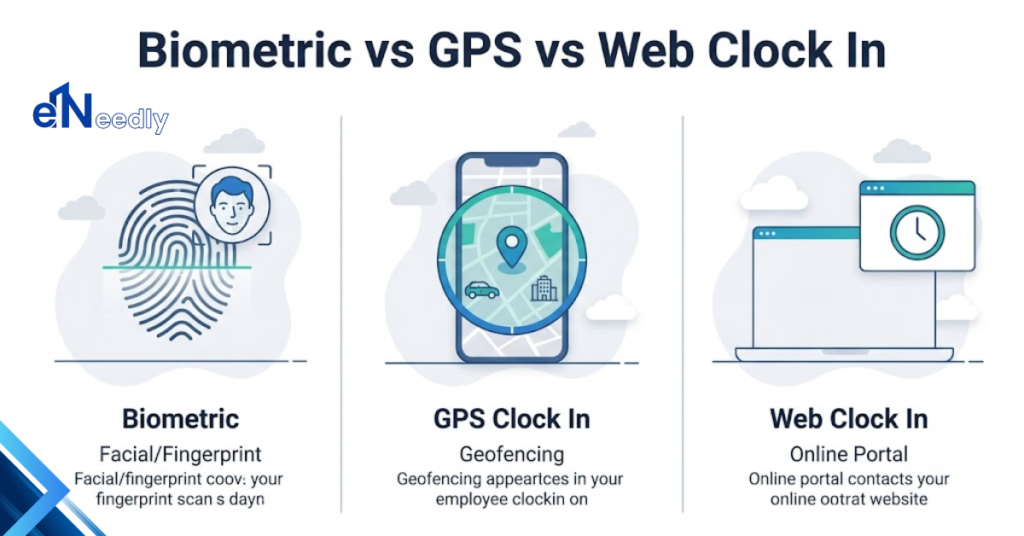
The table below compares the three most common approaches so you can match the method to your setup.
| Clock In Method | Best For | Key Strength | Consideration |
| Biometric | On-site staff | Stops buddy punching | Needs a scanner or camera |
| GPS and Geofencing | Field and remote teams | Verifies location | Requires a mobile device |
| Web and App | Office and hybrid staff | Fast and low cost | Relies on staff honesty |
For many businesses, the smartest setup blends methods. Office staff uses a web portal, field teams use GPS, and high-security areas use biometric verification.
How Cloud Attendance Software Integrates With Payroll and HR
The real power of cloud-based time and attendance software appears when it connects to the tools you already use. Integration turns attendance from an isolated log into the engine that drives payroll and HR.
Without integration, someone has to copy numbers between systems by hand. That manual step is slow and one of the biggest sources of payroll error.
Payroll Integration
When attendance flows straight into payroll, approved hours become paychecks with no re-entry. Over time, deductions and leave are calculated automatically from the same data.
This closes the gap where mistakes usually happen and speeds up every pay run. Finance teams trust the numbers because they come from a single verified source.
HR and Leave Management
Modern platforms fold leave requests, approvals, and balances into the same dashboard. Employees apply for time off, and once approved, the attendance record updates on its own.
This gives HR a full picture of availability and staffing in one place. It also removes the messy back and forth of email-based leave requests.
Best Cloud-Based Time and Attendance Software for Small Businesses
Small businesses have different needs than large enterprises, so the ideal software looks different, too. The priority is simplicity, low cost, and features that grow with the team.
A small business rarely needs every advanced module on day one. It needs a clean, affordable system that handles the essentials well and can expand later.
Look for a platform that offers a straightforward mobile app, transparent pricing, and easy payroll export. Avoid tools that lock you into expensive tiers before you actually need them.
At eNeedly, we guide small and growing businesses toward solutions that fit their budget and stage. Sometimes that means an off-the-shelf platform, and sometimes it means a lightweight custom build tailored to how the team actually works.
How to Choose the Right Cloud-Based Time and Attendance Management Software
Selecting the right system is a business decision, not just a software purchase. The best choice depends on your team size, work model, and the tools already in your stack.
Rushing this choice often leads to a tool nobody uses or one that fights your existing workflow. A short, structured evaluation prevents that costly mistake.
- Map how and where your team actually works
- List the clock-in methods you truly need
- Confirm it integrates with your payroll and HR tools
- Check security, data storage, and privacy practices
- Test the mobile experience before committing
- Compare pricing against real usage, not the headline rate
Assess Your Team Size and Structure
A ten-person office and a hundred-person field operation need very different systems. Start by mapping your headcount, roles, and work locations.
This clarity tells you which features are essential and which are noise. It also protects you from paying for capacity you will never use.
Check Integrations Before You Commit
A time system that does not connect to your payroll only shifts the manual work elsewhere. Always confirm integration with your existing tools before you buy.
Ask vendors for a live demo of the exact integration you need. A promise on a feature list is not the same as a working connection.
Evaluate Security and Data Privacy
Attendance data includes personal and biometric information, which carries real responsibility. Review how the vendor stores, encrypts, and protects that data.
Strong security is not optional when biometric records are involved. Choose providers that are transparent about compliance and data handling.
How eNeedly Helps Businesses Choose and Implement the Right Attendance Solution
Software is only as good as the way it is chosen, set up, and adopted. This is where many businesses stumble, and it is exactly where eNeedly adds value.
As a digital solutions agency with more than eight years of hands-on experience, we sit on the client side of the table, not the vendor side. Our goal is the system that fits your business, not the one with the biggest commission.
Custom Development and Integration
When off-the-shelf tools fall short, our development team builds and integrates solutions around your real workflow. We connect attendance, payroll, and HR so your data moves without manual copying.
This tailored approach removes the compromises that generic software forces on growing teams. You get a system shaped to your process, not the other way around.
Ongoing Support and Optimization
Implementation is the start, not the finish. We train your team, monitor adoption, and refine the setup as your business changes.
That continued partnership is what turns a software purchase into a lasting productivity gain. Our clients stay with us because we stay invested after going live.
Frequently Asked Questions
What is cloud-based time and attendance management software used for?
It is used to record employee working hours, manage clock-in and clock-out digitally, and sync that data to payroll and HR. Businesses rely on it to cut errors, prevent time theft, and manage teams from one online dashboard.
Is cloud-based time and attendance software secure?
Reputable platforms use encryption, secure servers, and access controls to protect attendance and biometric data. Always confirm the provider is transparent about data storage, encryption, and privacy compliance before you commit.
Can it track remote and field employees?
Yes. GPS tracking and geofencing let remote and field staff clock in from approved locations, and every entry is tagged with a verified location. This gives managers confidence that logged hours are genuine.
Does cloud attendance software work with payroll systems?
Most modern platforms integrate directly with payroll and HR tools, so approved hours flow through without manual re-entry. This integration is one of the biggest reasons businesses move to the cloud in the first place.
How much does cloud-based time and attendance software cost?
Pricing usually follows a per-employee monthly model, so cost scales with your team size. Small businesses can start on affordable tiers and expand as they grow, which keeps the initial investment low.
Is it suitable for small businesses?
Absolutely. Small businesses benefit from the low setup cost, simple mobile apps, and automatic timesheets that save hours of admin. The key is choosing a system that fits your current stage and can grow with you.
How does eNeedly help with time and attendance software?
eNeedly helps businesses evaluate, choose, and implement the right solution based on their real needs and budget. When standard tools fall short, our team builds and integrates custom solutions and supports you well beyond launch.