
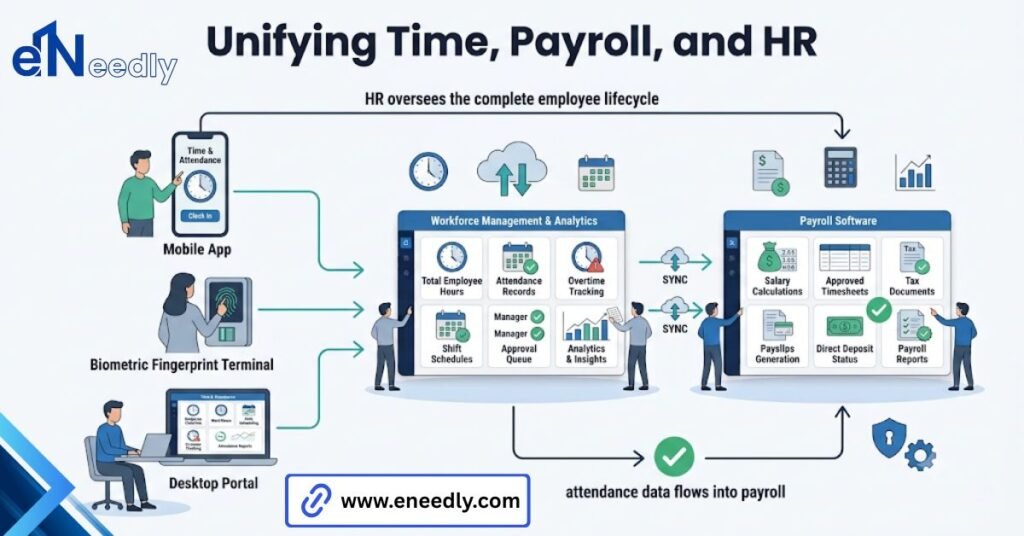
Time and attendance software with payroll integration captures employee hours and feeds them directly into payroll for calculating gross pay and deductions. It replaces manual timesheet exports with a native connection, an API, or a structured file export.
Businesses use it to cut processing time and reduce errors caused by entering hours twice. Most teams shopping for time and attendance software with payroll integration ask the wrong first question.
They ask whether it connects to their payroll system at all, get a yes, and move on. The question that actually matters is what happens to a timesheet correction after payroll has already pulled the data for the week.
That gap between “it connects” and “it connects well” is where most of the frustration in this category lives. This piece walks through what the connection actually does, where it tends to fail, and what to check before you sign anything.
What Payroll Integration Actually Means In Time And Attendance Software
Payroll integration means the hours an employee works get transferred to your payroll system without anyone retyping them. That sounds simple. It rarely is.
A real integration handles more than a total hour count. It carries overtime flags, shift differentials, PTO codes, and job costing labels along with the raw time, because payroll needs all of that to calculate gross pay correctly.
Some products call themselves integrated when all they do is generate a spreadsheet you upload somewhere else by hand. That is technically a connection. It is not what most buyers picture when they hear the phrase.
How Data Moves From Clock Out To Pay Run
An employee clocks out. That single event triggers very little on its own. The value shows up in what happens between the punch and the moment payroll closes the pay run.
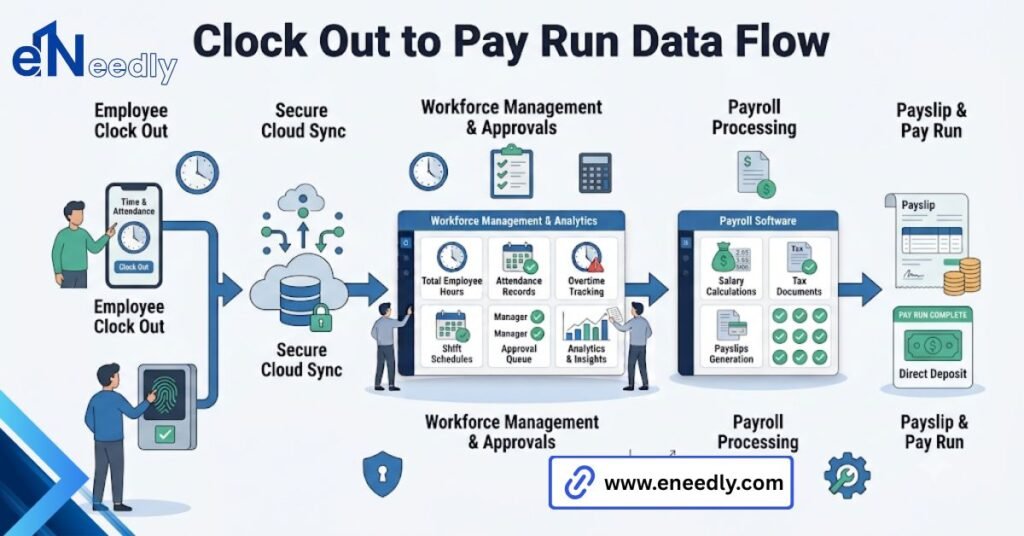
The time and attendance system first totals raw hours for the pay period. Then it applies rules on top: daily overtime, weekly overtime, break deductions, holiday pay.
Only after those rules run does the data become something payroll can actually use. Payroll then takes that processed number and runs its own layer: gross pay calculation, tax withholding, benefit deductions, garnishments. The time system does not touch any of that.
It hands off cleanly, rule applied, hours and steps back. Export timing matters more than people expect. A system that exports the moment a pay run opens locks in whatever hours existed at that second, corrections or not.
The Three Ways Time And Attendance Software Connects To Payroll
There are really only three mechanisms in use across this category, and each one trades something for something else.
Native integration means the vendor has built and maintains a direct connection to a specific payroll platform, usually one of the biggest names. Setup is fast. Your options are limited to those they support.
API integration is a more open connection, often built by your IT team or an implementation partner, that can talk to payroll systems without a pre-built native link. It is flexible. Someone has to build and maintain it.
File export is the oldest method: a structured CSV or similar file that gets uploaded into payroll manually or through a scheduled job. It works with almost anything. A person has to manage that file every single pay period.
| Method | Setup effort | Ongoing effort | Best fit |
| Native integration | Low | Low | Common payroll platforms, standard pay rules |
| API integration | High | Medium | Custom payroll setups, multiple systems |
| File export | Low | High | Legacy payroll, tight budgets, and simple pay structures |
Native integration suits a company running a mainstream payroll platform with standard pay rules. File export suits a company on an older or custom payroll system where nobody has built a native link yet.
Where Buyers Get Burned Asking: Does It Integrate With Our Payroll
Ask any vendor whether their product integrates with your payroll platform, and the answer is almost always yes. That yes is doing a lot of work, it should not be trusted to do it alone.
The Yes/No Question That Hides A Partial Answer
A yes/no question about integration hides a partial answer more often than buyers expect. The connection might exist, but only for basic hourly employees on one pay schedule.
The real question is what specifically maps across. Push for the field-level list: overtime rules, multiple pay rates, shift differentials, PTO accrual, job costing. If a vendor cannot answer that in detail, the integration is thinner than the sales deck suggests.
What Actually Needs To Be Mapped
A payroll integration that only passes total hours is barely an integration. It still leaves someone manually applying overtime rules and pay rate changes inside payroll, which is exactly the manual step the software was supposed to remove.
The teams that get burned are usually the ones with more than one pay rate per employee, split shifts, or a mix of exempt and non-exempt staff. Standard demos rarely show these cases because they are messy to demo.
Attendance Software With Payroll And HR, Not Just Payroll
Attendance software with payroll and HR built in goes further than the punch clock and export function. It usually covers PTO requests and approvals, scheduling, and basic employee records, all feeding the same central data set.
This matters because payroll accuracy depends on more than hours worked. An approved PTO day, a shift swap, a new hire’s start date. Each one changes what payroll should calculate, and each one needs to be reflected before the pay run closes, not after.
Buyers looking specifically for time and attendance software with payroll integration should decide early whether they want HR functions bundled in or whether a narrower, dedicated attendance tool paired with a separate payroll system fits their setup better.
What Breaks After Go Live
Nobody tests the integration against an edge case before go-live. Almost nobody. Then the first real edge case hits in production, and it is usually a timesheet correction submitted after the pay run has already closed.
That single scenario, a manager fixing a punch after payroll has pulled the data, is the actual test of whether an integration is good. Does the correction flow into the next pay run automatically, or does someone have to manually adjust a paycheck after the fact?
Retroactive pay adjustments are the other common failure point. An employee working two roles at different pay rates in the same week also trips up systems that were only ever tested with a single flat rate.
None of these are exotic situations. They happen in ordinary businesses every pay period. A system that has not been checked against them is a system running on hope.
How eNeedly Approaches Payroll Integrated Time Tracking Projects
eNeedly has spent more than eight years helping businesses evaluate and implement the right software rather than selling any one platform, which changes the shape of the conversation from the start.
The first step is usually mapping actual pay rules before touching a product list: overtime structure, multiple rates, PTO policy, and job costing needs. Only then does it make sense to compare native integration, API, or file export against what the business actually runs.
For businesses whose payroll setup does not fit neatly into what off-the-shelf products support, eNeedly also builds custom connections between time and attendance data and payroll, rather than forcing a workaround that someone has to babysit every two weeks.
What Actually Separates A Good Integration From A Marketed One
Vendors love the word seamless. It shows up in nearly every product description in this space. What actually separates a good integration from a marketed one is what happens when a manager corrects a timesheet after payroll has already pulled the data.
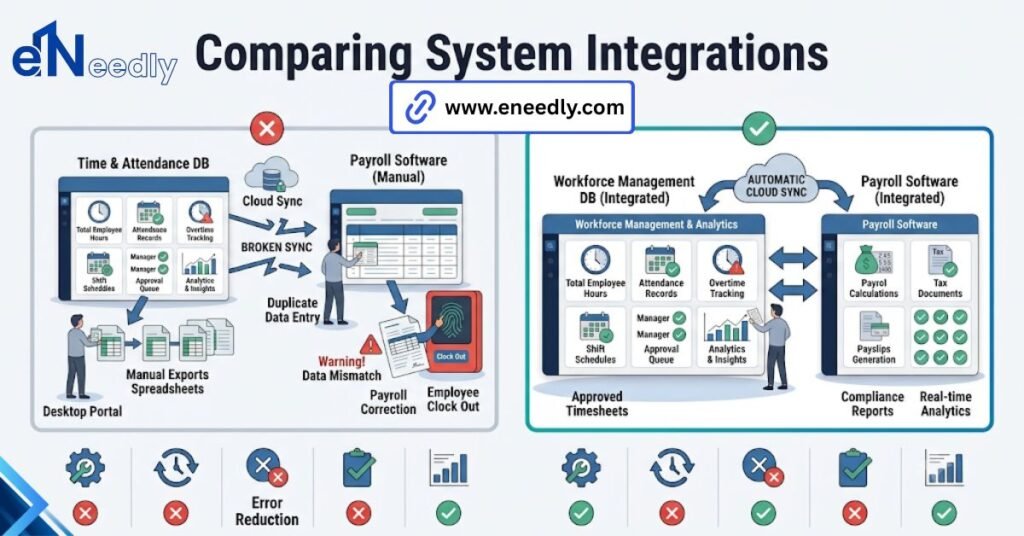
That single test tells you more than any feature list. If the correction has a defined path into the next pay run, the integration is real. If it requires someone to manually adjust a paycheck outside the system, you are looking at a connection, not an integration.
Frequently Asked Questions
What is time and attendance software with payroll integration?
It is software that tracks employee hours and sends that data directly into a payroll system for pay calculation. The goal is to remove the manual step of retyping hours into payroll each pay period.
Does payroll integration replace the need for a payroll system?
No. Time and attendance software handles hours and applies attendance rules. Payroll still calculates gross pay, tax withholding, and deductions on its own, using the hours the attendance system provides.
Can time and attendance software integrate with any payroll provider?
Not automatically. Native integrations only cover the specific payroll platforms a vendor has built connections for. Anything outside that list usually needs an API build or a file export instead.
What happens if an employee’s hours are corrected after payroll has already run?
This depends entirely on the system. Some route the correction to the next pay run automatically. Others require someone to manually adjust the paycheck after the fact, which is worth confirming before you buy.
Is a CSV file export considered payroll integration?
It is a form of integration, though a manual one. Someone still has to generate, review, and upload the file each pay period, so it removes retyping but not the human step entirely.
Does attendance software with payroll and HR cost more than a standalone tool?
Usually, yes, since it covers more functions. Whether that is worth it depends on whether a business wants scheduling and PTO tracking in the same system or prefers separate, specialized tools.
How long does it take to set up payroll-integrated time tracking?
Native integrations with common payroll platforms can be running within days. Custom API builds or complex pay rule mapping, especially with multiple pay rates or job costing, typically take several weeks.