
Quick Answer
Odoo standard configuration should always be the first choice, since it carries zero upgrade risk and no ongoing maintenance beyond Odoo’s own updates.
Custom development becomes justified only when a requirement involves logic, integrations, or industry-specific compliance that standard Odoo and Studio genuinely cannot express.
The decision should follow a strict hierarchy: standard configuration first, Studio second, custom code only as a last resort.
Introduction
Every Odoo project reaches a moment where a business asks whether a requirement needs custom development. Too often, the answer gets decided by instinct rather than an honest evaluation of the actual need.
This creates two common failure patterns. Some businesses over-customize early, adding complexity and long-term maintenance cost for problems standard Odoo already solves.
Others under-customize, forcing rigid workflows onto processes that genuinely need tailoring.
This guide gives a clear decision framework for choosing between standard Odoo and custom development. It builds on the broader picture covered in Odoo customization services and the technical process detailed in Odoo ERP customization.
What Standard Odoo Actually Covers
Standard Odoo, sometimes described as out of the box functionality, covers an unusually broad range of business processes for a single platform.
Sales, Inventory, Accounting, Purchase, CRM, and Manufacturing all ship with functional default workflows that many businesses never need to modify.
Odoo’s built-in settings allow substantial configuration without touching code or Studio. Approval thresholds, automated emails, default views, and access permissions can all be adjusted through standard settings menus.
The scope of what counts as standard has also grown significantly across recent versions, with more configurable automation and reporting available by default than earlier releases offered.
A requirement that needed custom development in an old version sometimes turns out to be standard behavior in a current one.
The Real Cost of Custom Development
Custom development is never a one-time expense, even when the invoice makes it feel that way. Every custom module introduces ongoing obligations that standard Odoo does not carry.
Upgrade Risk
Upgrade risk is the most significant long-term cost of custom development. Odoo releases new major versions regularly, and custom code must be tested and often modified to remain compatible with each one.
Properly built custom modules using inheritance patterns handle upgrades far more predictably than code that directly modifies core files.
Even well-built custom code, though, still requires testing time and occasional rework that standard configuration never needs.
A business running five years of accumulated custom modules can find upgrade projects taking significantly longer than a business running standard Odoo with light Studio customization.
This gap widens with every additional custom module added over time.
Maintenance Overhead
Maintenance for custom code extends beyond version upgrades. Security patches, bug fixes, and compatibility checks against other installed apps all require ongoing attention that standard Odoo functionality does not.
A custom module built by a developer who is no longer available creates a specific risk: nobody fully understands the code’s dependencies or edge cases. This is why documentation, covered in the customization process guide, matters as much as the code itself.
Businesses budgeting for custom development should factor in a recurring maintenance line item, not just the initial build cost. eNeedly’s Odoo customization cost guide breaks down what this ongoing cost typically looks like across different customization tiers.
Scalability Considerations
Scalability cuts in both directions on this decision. Standard Odoo scales cleanly as a business adds users, locations, or transaction volume, since Odoo’s core team has already optimized this path.
Custom code can scale just as well if built correctly, but poorly architected customizations can become performance bottlenecks as data volume grows. A computed field with inefficient logic that works fine with a thousand records can slow the entire system down at a hundred thousand records.
This is a common blind spot early in a project, since performance issues at scale are invisible during initial testing with small datasets. Testing custom logic against realistic data volumes before deployment catches this risk early.

When Standard Odoo Is the Right Choice
Standard Odoo is the right choice whenever a requirement can be met through existing settings, permissions, or built-in automation.
The test is straightforward: if the desired outcome is achievable by clicking through Odoo’s own configuration menus, customization is unnecessary.
Standard Odoo also fits businesses in their first months on the platform, before the team has enough real usage experience to know what genuinely needs changing.
Requirements that feel urgent in week one sometimes disappear once the team adapts to how Odoo’s default workflow actually operates.
Industries with common, well-established business processes, such as general retail, wholesale distribution, or professional services, often find standard Odoo covers the large majority of their needs.
These industries have shaped Odoo’s default functionality over years of real-world use across similar businesses.
When Custom Development Is Genuinely Justified
Custom development is justified when a requirement involves calculation logic, conditional rules, or integrations that neither standard settings nor Studio can express.
A proprietary commission structure with multiple interacting variables is a clear example that belongs in custom code.
Industry-specific regulatory or compliance requirements often justify customization, particularly when a filing format or calculation method is legally mandated and does not match Odoo’s default reporting.
These requirements are not optional or a matter of preference, which strengthens the case for custom investment.
Integration with a proprietary internal system that has no existing connector is another legitimate justification.
This work genuinely cannot be solved through configuration, since it requires code that bridges two systems Odoo was never built to communicate with directly.
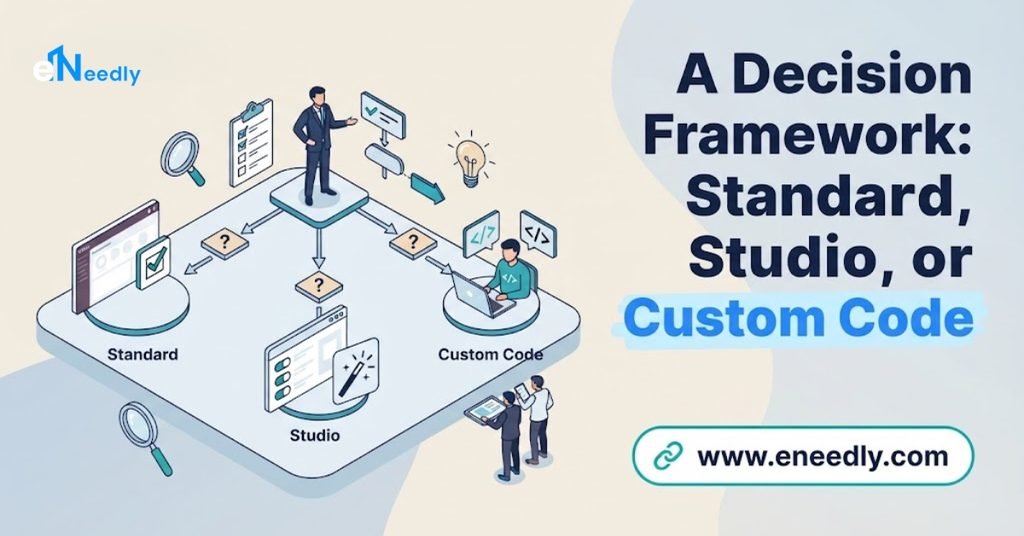
A Decision Framework: Standard, Studio, or Custom Code
The most reliable way to make this decision follows a three-step test applied to every requirement individually, rather than deciding on customization as a blanket strategy for the whole project.
First, check whether standard Odoo settings, permissions, or built-in automation already solve the requirement. This step alone resolves a surprising share of requests that initially seemed to need customization.
Second, if standard settings fall short, test whether Odoo Studio can build the solution through its no-code interface. Studio handles most field additions, view changes, and basic automation without any code.
Third, move to custom development only when both prior steps genuinely fail to meet the requirement. At this point, the justification should be documented clearly, both for the current decision and for whoever manages the system in the future.
Best Practice for Long-Term Odoo Health
Best practice across successful long-term Odoo deployments consistently favors restraint in customization.
Businesses that revisit this decision honestly every time a new request comes in tend to accumulate less long-term technical debt than businesses that default to customization out of habit.
This does not mean avoiding customization entirely. It means treating every customization decision as a genuine cost-benefit evaluation rather than an automatic yes to any request that feels important at the moment.
Documenting the reasoning behind every customization decision, standard or custom, protects the business against losing that context when staff or providers change.
A business that can explain why each custom module exists maintains far more control over its own system than one that has forgotten the original justification.
Who This Decision Framework Is For
Operations leaders and finance heads evaluating a growing list of customization requests benefit most from applying this framework systematically.
It turns a subjective debate into a structured evaluation with a consistent, defensible answer each time.
Businesses planning a version upgrade should also apply this framework retroactively to existing customizations.
Some custom modules built years ago may no longer be necessary if standard Odoo has since added equivalent functionality natively.
This framework matters less for a business that has not yet identified any specific customization requests.
That evaluation only becomes relevant once real usage surfaces genuine gaps between standard Odoo and actual business needs.
Frequently Asked Questions
Should I always try standard Odoo before customizing?
Yes, standard configuration should always be the first step, since it carries no upgrade risk and no ongoing maintenance beyond Odoo’s own updates. Customization should only follow once standard settings and Studio genuinely cannot meet the requirement.
What is the biggest hidden cost of custom development?
Ongoing maintenance across future version upgrades is the most overlooked cost, since custom code needs testing and occasional rework with every major Odoo release. This cost continues long after the initial development invoice is paid.
Can custom code slow down Odoo as data grows?
Yes, poorly architected custom logic can become a performance bottleneck at scale even when it works fine during initial testing with small datasets. Testing against realistic data volumes before deployment helps catch this risk early.
Does newer Odoo cover more out of the box than older versions?
Yes, Odoo’s built-in configuration options have expanded across recent versions, meaning some requirements that once needed custom development may now be achievable through standard settings. It is worth re-evaluating older customizations against current version capabilities.
How do I know if a requirement genuinely needs custom code?
Test it against standard settings first, then Odoo Studio, and only consider custom development if both fail to meet the actual need. Genuine candidates usually involve complex calculations, regulatory compliance, or integrations with no existing connector.
What industries typically need more customization than others?
Industries with specific regulatory requirements or highly specialized operational logic, such as certain manufacturing or compliance-heavy sectors, typically need more customization than general retail or professional services.
Common, well-established business processes are more likely covered by standard Odoo already.
Key Takeaways
The standard versus custom decision should never be made once for an entire project. It should be applied individually to every requirement, following the same disciplined sequence of standard configuration, then Studio, then custom code as a last resort.
Custom development carries real ongoing costs in upgrade risk and maintenance that standard Odoo does not, which is why restraint protects a business’s long-term system health more than an aggressive customization strategy ever does.
Documenting the justification behind every customization decision preserves that reasoning for whoever manages the system next.
Apply the three-step test to your next requirement before assuming it needs custom development.