
Quick Answer
AI-driven data risk assessment finds where your sensitive data lives, scores how exposed it is, and shows you what to fix first.
With automated remediation and policy enforcement added, the system can also correct many problems on its own, such as removing risky access or locking down exposed files, and keep checking that your data rules are followed.
eNeedly builds these solutions around your own data, policies, and systems, with your team approving the important actions.
Your business holds a great deal of valuable data: customer details, financial records, contracts, employee files, and internal plans. That data is spread across many places, from shared folders and databases to cloud storage and email. Every copy is a possible risk.
Most companies know this. The real challenge is keeping up. New files appear every minute, permissions change, and people share things in ways nobody planned. Finding problems by hand is slow, and fixing them is slower still.
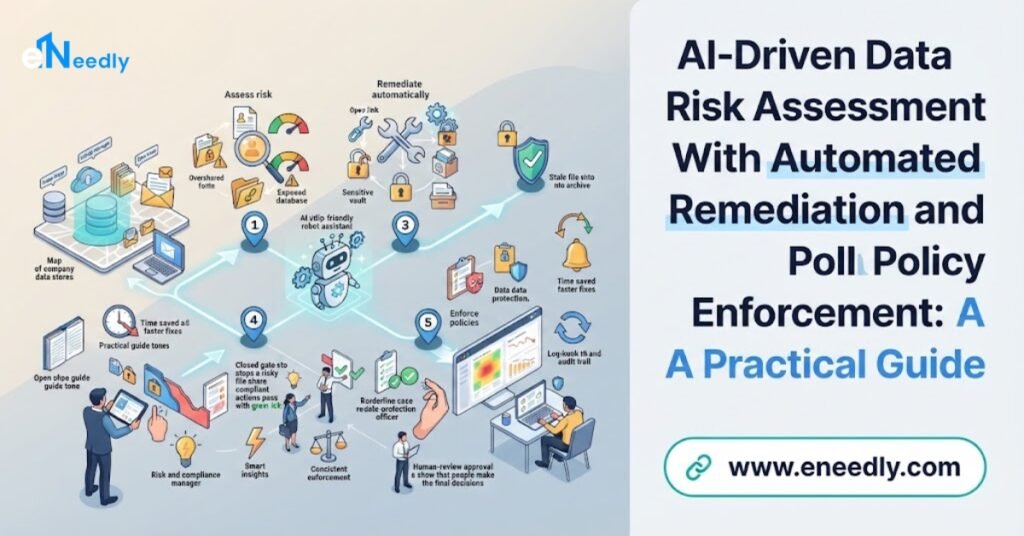
This is where AI-driven data risk assessment with automated remediation and policy enforcement helps. It finds the risks, fixes the clear ones, and keeps watching. In this guide, we explain how it works, what to look for, and how eNeedly can help you build it.
What Is AI-Driven Data Risk Assessment?
Data risk assessment is the process of working out where your data is, how sensitive it is, who can reach it, and how likely it is to be misused, lost, or exposed.
Doing this by hand means interviews, spreadsheets, and occasional reviews. The picture is out of date almost as soon as it is finished. AI changes this by looking at your data environment continuously and making sense of what it finds.
A good AI-driven assessment can:
- Discover data across your files, databases, and cloud services, including places you may have forgotten.
- Recognize sensitive information such as personal details, financial records, and confidential documents.
- Check who has access and whether that access makes sense.
- Spot risky conditions such as public sharing, weak settings, and old data nobody needs.
- Score each risk by how likely and how serious it is.
- Explain the reasons in plain language, so your team knows why something matters.
The result is a clear, current map of your data risk, instead of a guess.
Why Is Data Risk So Hard to Manage Manually?
Data risk grows quietly. Here are the most common reasons manual methods fall short.
- Too much data: The volume is far beyond what a team can read or review.
- Data in many places: Files live in shared drives, cloud storage, email, databases, and personal folders.
- Constant change: New data is created and shared every day, and permissions shift all the time.
- Unclear sensitivity: Nobody knows which files contain private or regulated information.
- Over-sharing: Links and folders are opened to everyone for convenience and never closed.
- Stale data: Old files that nobody needs still sit in storage, waiting to be exposed.
- Slow fixes: Even when a problem is found, it can sit in a queue for weeks.
- Weak proof: It is hard to show later what was checked and what was done.
The gap between finding a problem and fixing it is where most damage happens. Automation is designed to close that gap.
How Does AI-Driven Data Risk Assessment Work?
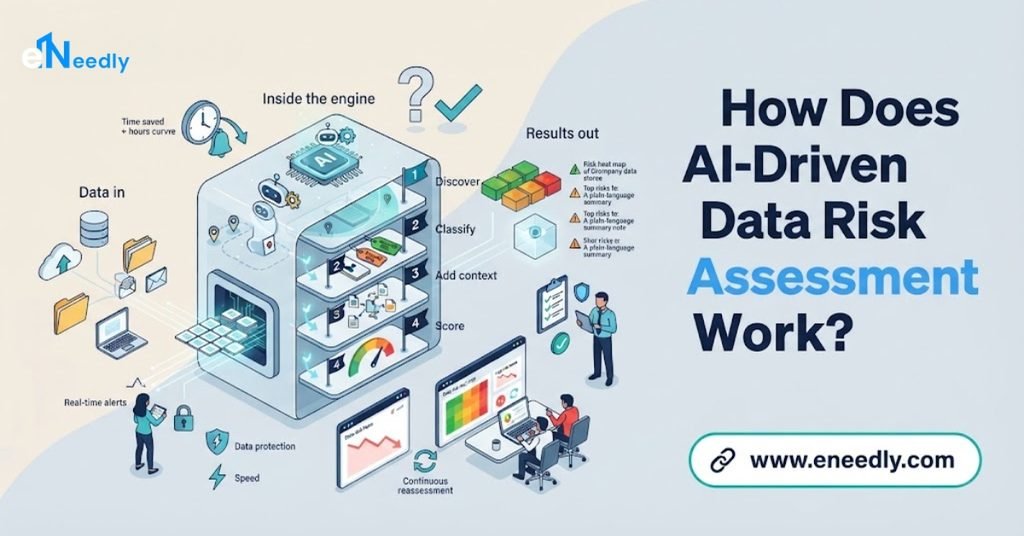
A strong solution follows a clear flow from discovery to proof.
Connect to your data sources. The tool links to the places where your data is stored and shared.
Discover and classify. AI scans for data and labels it by type and sensitivity, such as public, internal, confidential, or highly sensitive.
Map access. The system works out who and what can reach each piece of data.
Assess risk. It combines sensitivity, exposure, and behavior to score the risk of each item.
Prioritize. The riskiest issues rise to the top, so your team knows where to start.
Check against policy. Each finding is compared with your data rules.
Act. The system fixes clear problems automatically or sends them for approval.
Record and report. Every finding and action is saved and shown in clear reports.
The cycle repeats continuously, so your picture of risk stays current.
What Is Automated Remediation?
Remediation means fixing a problem once it has been found. Automated remediation means the system carries out the fix, or prepares it, without waiting for someone to do each step by hand.
Common automated fixes include:
- Removing public or overly broad sharing: Closing links and folders that are open to far more people than needed.
- Reducing excess access: Taking away permissions that a person or system no longer needs.
- Moving or quarantining data: Placing risky files in a safe, restricted location.
- Protecting sensitive fields: Applying data masking or encryption so that private details are hidden from people who should not see them.
- Deleting or archiving old data: Removing information that is past its retention period.
- Fixing weak settings: Correcting storage or sharing settings that do not meet your standard.
- Raising tasks: Creating a ticket for the right owner when a fix needs a person.
- Notifying people: Telling the data owner what was found and what was done.
Automation matters here because speed matters. A file exposed to the whole internet should not wait for the next weekly review.
How Does Automated Policy Enforcement Fit In?
A policy is a rule about how data must be handled, such as customer records must never be shared outside the company, or sensitive files must be kept for no more than a set time.
Automated policy enforcement makes those rules work every day. Instead of relying on people to remember them, the system checks data and actions against the rules continuously.
Here is how the three parts work together:
- Assessment finds where data is and how risky it is.
- Policy enforcement compares what it finds with your rules and spots breaches.
- Remediation corrects the breach, or routes it to a person.
Without policies, automation has no standard to follow. Without automation, policies are only words on paper. When combined, your rules become real protection.
Which Data Risks Can AI Find and Fix?
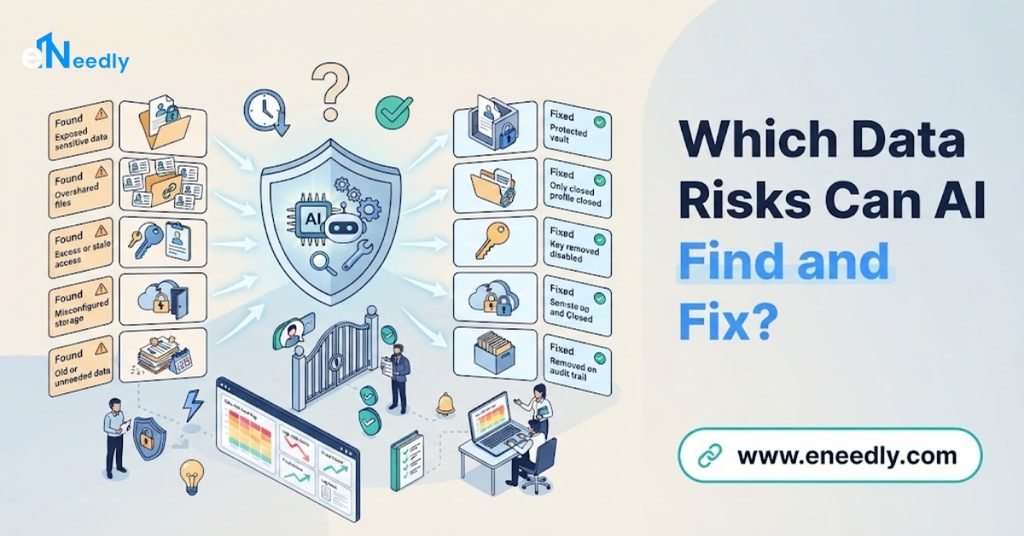
More than most teams expect. Common examples include:
- Sensitive data in the wrong place: Personal or financial details stored in open folders, email attachments, or shared spreadsheets.
- Publicly shared files: Documents available to anyone with a link.
- Excess access: Staff or systems with far more access than their role needs.
- Former staff and unused accounts: Access that was never removed after someone left.
- Misconfigured storage: Settings that leave data open or unprotected.
- Duplicate and stale data: Copies and old files that multiply risk without adding value.
- Unusual activity: Large downloads, odd access times, or sudden sharing that does not match normal behavior.
- Policy breaches: Data kept too long, moved to unapproved locations, or shared with unapproved parties.
- Missing protection: Sensitive data that should be encrypted or masked but is not.
At eNeedly, we start with the risks that are most likely and most serious for your business, then expand from there.
How Do You Keep Humans in Control of Automatic Fixes?
Automatic action is powerful, which is exactly why it needs limits. A fix made in error could block someone from work they need to do. The best setups keep people in control where it counts.
Here is how:
- Match the action to the risk. Clear, low-risk fixes can be automatic. High-impact fixes should wait for approval.
- Start in report-only mode. Let the system show what it would do before it does anything, and build trust step by step.
- Set clear limits. Decide in advance which actions the system may take alone and which it may not.
- Name owners. Every data area should have a responsible person who receives alerts and approves changes.
- Make fixes reversible. Where possible, changes should be easy to undo.
- Record everything. Every automatic action is logged with the reason and the rule behind it.
- Review regularly. People should check how the system is performing and adjust the rules.
This balance keeps response fast without making it blind.
What Should You Look for in a Solution?
There is no single best approach for every business. The right choice is the one that fits your data, policies, and team. Use this checklist to judge any solution.
- Wide coverage: It should reach the places where your data actually lives.
- Accurate discovery: It should recognize sensitive data correctly and show how sure it is.
- Clear risk scores: Every score should come with reasons that people can understand.
- Flexible policies: You should be able to write and change rules in your own terms.
- Controlled automation: You should choose which fixes are automatic, which need approval, and which only raise a task.
- Safe, reversible actions: Changes should be tested, logged, and easy to undo.
- Complete audit trail: Every finding, action, and decision should be recorded and easy to report.
- Fit with your systems: It should work with the tools and platforms you already use.
- Strong security: A tool that sees your sensitive data must itself be very well protected.
- Ongoing support: Data, risks, and rules change, so help should not end at launch.
If a solution cannot meet most of these points, keep looking.
How Do You Measure Success?
Good data protection should show up in numbers. Track a few simple signals.
- Time to find a risk: How quickly are new problems detected?
- Time to fix: How long from detection to correction?
- Open high-risk issues: Is the number falling over time?
- Exposure of sensitive data: How much sensitive data is overshared or unprotected?
- Policy breach rate: Are breaches becoming less frequent?
- Manual effort: How many hours does your team spend on routine checking and fixing?
- Audit readiness: How quickly can you produce evidence when asked?
Review these regularly and use them to improve your rules and your process.
What Are the Risks and Limits of Automated Remediation?
Automation is powerful, but it is not perfect. Knowing the limits helps you plan well.
- Wrong classification: AI may mislabel a file, so sensitive items might be missed or harmless ones flagged. Tuning and review reduce this.
- Disruption from fixes: A rule that is too aggressive can block legitimate work. Start small and test carefully.
- Incomplete coverage: The system can only protect data it can see. Gaps in connections mean gaps in protection.
- Over-reliance: A calm dashboard does not mean all risk is gone. Regular human review still matters.
- Rules that are out of date: Policies that no longer match how people work will cause errors.
- Security of the tool itself: A system with access to so much sensitive data must be protected carefully.
- Team resistance: People need clear communication and simple processes, or they will work around the new controls.
A well-designed solution begins with a small set of important rules, tests them in report-only mode, keeps humans in the loop for high-impact actions, and reviews results on a regular schedule. eNeedly builds all of this in from the start.
Should You Buy Off-the-Shelf or Build a Custom Solution?
This is a key decision. Ready-made options can be a good starting point for simple needs. But as your business grows, they often show their limits.
A ready-made option works best when:
- Your data lives in a small number of common places.
- Your policies are standard.
- You do not need special approval steps or reports.
A custom solution works best when:
- Your data is spread across many different or in-house systems.
- You have your own policies, thresholds, and approval steps.
- You need fixes to happen inside the tools your team already uses.
- You need reports that match your auditors’ exact needs.
- You want one connected process instead of several separate tools.
Many businesses find that a tailored setup saves more time in the long run, because it fits their process instead of forcing the process to fit the tool. eNeedly can help you decide which path makes sense, and we will tell you honestly if a simple option is enough.
How Do You Get Started Step by Step?
You do not need to protect everything at once. Follow these steps.
List your main data locations. Write down where your important data is stored and shared.
Decide what matters most. Identify the data types that would hurt most if exposed.
Write your key policies. Start with a few clear rules, such as who may access sensitive data and how long it may be kept.
Run a first assessment. Let the system discover and score your data without changing anything.
Review the findings. Check that the results make sense and tune the rules.
Turn on automation gradually. Begin with low-risk fixes, and add approval steps for bigger ones.
Measure and expand. Track your results, then add more data sources and rules.
This approach keeps risk low and shows results early.
Why Choose eNeedly for Data Risk Automation
eNeedly is a digital solutions agency. We do not push a one-size-fits-all product. We study how your business handles data today and build a solution around your systems, your policies, and your goals.
Here is what you can expect when you work with us:
- Plain language: We explain everything clearly, even if you are not technical.
- Business-first thinking: We start with your goals, such as fewer exposures and easier audits, and work backward.
- Tailored solutions: Your system is built around your data and your rules, not a generic template.
- Honest advice: If a fix is not worth automating, we will tell you.
- Security and control: Your people stay in charge of important decisions, and your data is handled with great care.
- Long-term partnership: We stay with you after launch to improve and expand what we build.
Our aim is simple: find your data risks early, fix them quickly, and prove it.
Our Data Risk Assessment and Remediation Services
eNeedly offers services that cover the full journey from discovery to proof, so you can start where it makes the most sense.
- Data discovery and classification: We build systems that find your data and label it by sensitivity.
- Access and exposure analysis: We map who and what can reach your data and highlight risky sharing.
- Risk scoring: We create scoring around your own priorities, with clear reasons for every result.
- Policy rule design: We turn your written data policies into clear, checkable rules.
- Automated remediation: We set up safe, controlled fixes, with approval steps for high-impact actions.
- Policy enforcement: We make sure your rules are checked continuously, not just during reviews.
- Alerts and tasks: We send the right issue to the right owner, with all the details they need.
- Audit logging and reporting: We record every finding and action and create reports that are ready for auditors.
- Dashboards: We give you a clear view of risk, fixes, and trends.
- Custom solutions: If your process is unique, we design something that fits it exactly.
Each service is built to solve a specific problem, and we only recommend what fits your business.
Our Step-by-Step Implementation Process
Our process is simple, transparent, and built to keep you informed.
Discovery call: We learn about your business, your data, and how risk is handled today.
Opportunity map: We list the checks and fixes that can be automated and rank them by impact and effort.
Plan and quote: You receive a clear plan, timeline, and price before any work begins.
Build: We create your solution and connect it to your systems.
Testing: We test it in report-only mode on real examples and set review points for your team.
Launch and training: We go live and show your team how everything works.
Support and improvement: We monitor results, tune the rules, and suggest new ways to reduce risk and save time.
You are involved at every stage, and nothing goes live without your approval.
Results You Can Expect From eNeedly
Every business is different, but the goals of data risk automation are consistent. When we work with you, we aim for results like these:
- Clear visibility: A current map of where your sensitive data lives and who can reach it.
- Faster fixes: Less time between finding a problem and correcting it.
- Fewer exposures: Less oversharing, fewer stale files, and tighter access.
- Consistent rules: Policies that are checked every day, not once a year.
- Less manual work: Hours of checking and chasing returned to your team.
- Audit readiness: A full trail of findings, actions, and decisions at your fingertips.
We agree on clear goals at the start, so you know exactly how to measure success.
Get Started With eNeedly Today
Starting is easier than most people think. You do not need technical knowledge, a long brief, or a perfect plan. You only need to tell us where your important data lives and which risks worry you most.
In a free consultation, we will listen to how your team works, point out where automation can help most, and explain what a first project could look like. There is no pressure and no obligation.
Ready to find and fix data risks before they become problems? Book your free consultation with eNeedly today and see what AI-driven data risk assessment with automated remediation and policy enforcement can do for your business.
Frequently Asked Questions
What is AI-driven data risk assessment?
It is the use of AI to discover where your data is stored, recognize which data is sensitive, check who can access it, and score how risky each situation is. It gives your team a current, prioritized view of data risk instead of an occasional manual review.
What is automated remediation in data security?
Automated remediation means the system fixes problems it finds, or prepares the fix, without waiting for each step to be done by hand. Examples include closing public sharing, removing unneeded access, quarantining risky files, and masking sensitive fields.
How does automated policy enforcement work?
Your data rules are turned into clear conditions that the system checks continuously. When data or an action breaks a rule, the system can flag it, route it for approval, or correct it, and it records what happened and why.
Can AI fix data risks without human approval?
It can for clear, low-risk problems, but for high-impact changes it is wise to require approval. The best approach is to start in report-only mode, build trust, and then turn on automatic fixes step by step. eNeedly helps you set the right limits for each type of action.
How accurate is AI at finding sensitive data?
It can be very good, but no system is perfect. It may mislabel some items, which is why good solutions show their confidence, allow easy corrections, and improve through tuning. Human review of important findings remains part of a healthy process.
How much does it cost to build this kind of solution?
The cost depends on the number of data sources, the complexity of your policies, the level of automation you want, and how much ongoing support you need. Starting with your most important data keeps the investment manageable. eNeedly provides a clear plan and quote after your free consultation.
Can the solution connect to my existing systems and storage?
In most cases, yes. A well-built solution is designed to connect with the tools and storage you already use, so your team does not have to start over. We review your current setup during discovery and plan the connections before any work begins.
How long does it take to set up?
A focused first project covering your most important data and a few key policies can often be ready in a matter of weeks. Larger projects with many data sources and automatic fixes are best delivered in phases, so you see benefits early and keep gaining more as each part goes live.