

Quick Answer
Accounting content automation with AI platforms helps a small firm plan, draft, review, schedule and repurpose the content it needs to attract and keep clients: blog articles, newsletters, deadline reminders, social posts, client emails and answers to common questions.
AI prepares first drafts and handles the repetitive scheduling and distribution, while a qualified person checks accuracy, tone and professional compliance before anything is published. The best setup is a simple, well-connected workflow, not a pile of tools.
eNeedly, a digital solutions agency with over 8 years of experience in digital marketing, content and workflow automation, helps small firms build the content calendar, approval steps, website, email workflows and reports that keep their marketing consistent without taking over their week.
Why Do Small Firms Need Accounting Content Automation?
Small accounting firms are built on expertise and trust, but marketing is usually squeezed into the gaps between client work. Common problems include:
- Seasonal pressure. Filing deadlines and busy periods leave no time to write.
- Inconsistent publishing. The blog goes quiet for months, and newsletters are sent only when someone remembers.
- No clear plan. Content is created on impulse instead of following a calendar.
- Same questions repeated. Clients ask the same things every year, but the answers are not shared in writing.
- Technical topics are hard to explain. Firms know the details but find it difficult to write them in simple language.
- Review bottlenecks. Partners must check everything, and drafts wait in inboxes.
- Scattered channels. Website, email, social media and client portals are managed separately.
- Little measurement. The firm does not know which content brings inquiries.
- Limited staff and budget. Hiring a full-time marketer is not realistic.
- Compliance worries. Firms must be careful that marketing is accurate and does not mislead.
Content matters because most potential clients search online, read about a firm and compare options before they call. Regular, helpful content shows expertise and keeps current clients informed. The broader practice is often described as content marketing.
What Does Content Automation Mean for an Accounting Firm?
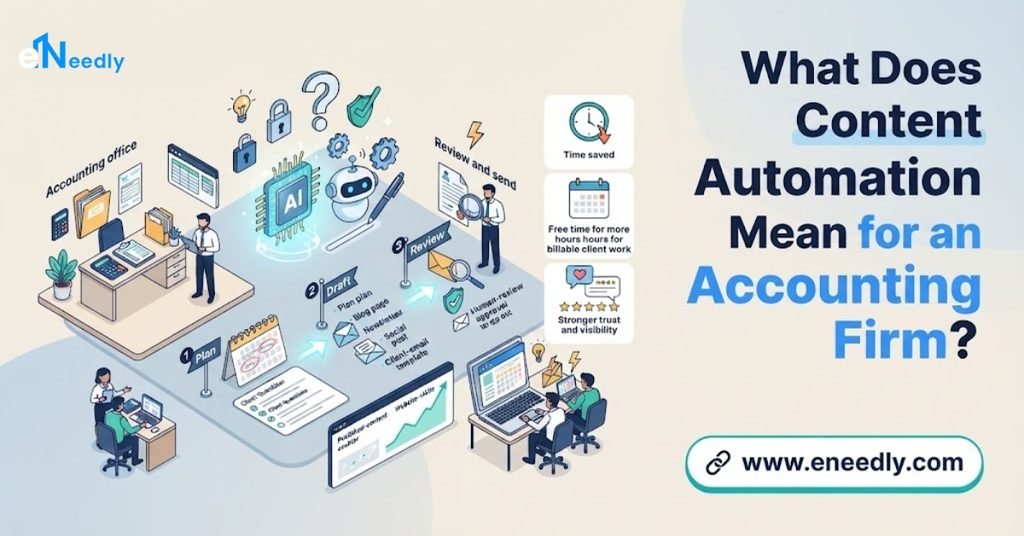
Content automation does not mean publishing machine-written text without thought. It means using software and AI to remove the repetitive parts of content work, so the firm’s expertise reaches clients more consistently.
In practice, it covers:
- Planning: building a calendar around the firm’s year, such as deadlines, seasons and common client questions.
- Drafting: using AI to prepare first drafts, outlines and variations.
- Review and approval: routing drafts to the right person, with clear checklists and deadlines.
- Formatting and scheduling: placing content on the website, in newsletters and on social channels at the right time.
- Repurposing: turning one article into a newsletter item, several social posts and a short client email.
- Reminders and alerts: sending deadline and document reminders to clients automatically.
- Capturing inquiries: connecting content to forms and follow-up, so interest becomes conversations.
- Reporting: showing which content is read and which brings inquiries.
The rule is simple: AI drafts, people decide.
What Content Can a Small Accounting Firm Automate?
Blog articles and guides
AI can propose topics from common client questions, prepare outlines and write first drafts on topics such as how to prepare for the year-end, what records to keep or how to choose a business structure. A qualified person must verify all technical statements.
Newsletters
A regular client newsletter can be assembled from approved blog items, deadline reminders and firm news, then scheduled automatically.
Deadline and document reminders
Automated emails and messages remind clients of important dates and the documents the firm needs from them, which reduces last-minute chasing. Dates must be confirmed by the firm for the relevant region.
Client onboarding messages
Welcome emails, document checklists, explanation of the process and next steps can be sent automatically to every new client.
Frequently asked questions
An FAQ section on the website, built from real client questions and approved answers, helps visitors and reduces repeated emails.
Social media posts
AI can prepare short posts from articles, for example a tip of the week, a deadline reminder or a seasonal checklist, for review and scheduling.
Service pages and case summaries
AI can help draft clear service descriptions and anonymized, approved examples of how the firm helps clients.
Email follow-ups to inquiries
New inquiries can receive a prompt, friendly reply and a booking link, followed by reminders.
Review requests
Satisfied clients can be asked for feedback and reviews at the right moment, automatically.
Internal knowledge
Approved answers and explanations can be stored in one place, so staff give consistent replies.
What Is an AI Content Platform, Really?
For a small firm, a content automation platform is rarely a single product. It is a small set of connected building blocks.
- A content calendar showing what will be published, when and by whom.
- An AI drafting assistant that prepares outlines and first drafts from your inputs and approved material.
- An approval workflow that routes drafts to reviewers with deadlines.
- A website and blog where articles and FAQs live.
- An email system for newsletters and reminders.
- A social scheduling tool for posts.
- A client list or record system so messages reach the right people.
- Forms and booking to capture inquiries.
- Analytics and reporting to show what works.
- Connections between them, so information flows without copying and pasting.
The value comes from how well these fit your way of working. A small, simple, connected set beats a large collection nobody has time to manage.
What Should You Look for in an AI Content Platform or Workflow?
Use these questions to judge any option.
Does it support human review? Every draft should have a clear approval step before publication.
Can it use your approved material? The best results come from your own explanations, checklists and past articles.
Does it handle your tone? Content should sound like your firm: clear, professional and approachable.
Can you control accuracy? You should be able to see sources, mark facts for verification and avoid unsupported claims.
Does it fit your calendar? It should help plan around deadlines and busy seasons.
Does it connect with your website and email? Manual copying defeats the purpose.
Is client data protected? Client information must never be exposed, and the platform must handle data carefully.
Does it keep records? You should know who approved what and when.
Is it easy for a small team to use? Complexity kills adoption.
Does it show results? You need to see traffic, inquiries and engagement.
Is support available? Someone should help when things go wrong.
Is the total cost reasonable? Consider subscriptions, setup time and training.

What Are the Risks of AI-Generated Content for an Accounting Firm?
Accounting is a trust profession, so the risks need serious attention.
Inaccurate technical content. AI can produce confident but wrong statements about tax, accounting or regulation. Every technical statement must be verified by a qualified person.
Out-of-date information. Rules and deadlines change and differ by region. Content must be checked against current requirements.
Giving advice by accident. General articles must not read as personal advice, and disclaimers should be used where appropriate. Confirm your professional body’s guidance.
Confidentiality. Never put client names, figures or documents into a tool unless you are certain how that data is handled and that doing so is permitted.
Generic or repetitive writing. Content that sounds like everyone else’s does not build trust. Add your own experience and examples.
Misleading claims. Marketing must be truthful and consistent with professional rules on advertising and promotion.
Copying. Make sure content is original and does not reproduce other sources.
Tone mistakes. An automated message that sounds cold or pushy can damage relationships.
Over-automation of client messages. Reminders are helpful, but sensitive matters need a personal touch.
A clear review checklist and a named reviewer for every piece of content address most of these risks.
A Simple Review Checklist for Every Piece of Content
Before anything is published or sent, check:
Accuracy. Has a qualified person verified every technical statement and number?
Currency. Is it correct for the current period and for the relevant region?
Scope. Is it general information, with no hint of personal advice, and does it carry any needed disclaimer?
Confidentiality. Does it avoid any client-identifying detail?
Tone. Does it sound like the firm?
Clarity. Would a client with no accounting background understand it?
Compliance. Does it follow your professional body’s rules on communications and advertising?
Originality. Is it free from copied material?
Call to action. Does it tell the reader what to do next?
Links and details. Are contact details and links correct?
How to Build a Content Automation Workflow Step by Step
Step 1: Define goals and audience
Decide what the content should achieve, such as more inquiries from small businesses, better client retention or fewer repeated questions, and who you want to reach.
Step 2: Collect real client questions
List the questions clients ask most, by season. These are your best topics.
Step 3: Build a yearly content calendar
Place topics around deadlines, seasons and firm events, with a realistic rhythm, such as two articles and one newsletter per month.
Step 4: Create an approved knowledge base
Gather your own explanations, checklists and standard answers. These become the material the AI draws on.
Step 5: Set your voice and rules
Write a short guide to your tone, terms to use and avoid, standard disclaimers and topics that always need partner review.
Step 6: Choose your building blocks
Decide which calendar, drafting assistant, website, email and scheduling tools you will use, and keep the set small.
Step 7: Design the approval workflow
Decide who drafts, who reviews and who approves, with deadlines and reminders, so drafts do not stall.
Step 8: Connect the pieces
Link the calendar, drafting, website, email and social tools, so approved content flows to each channel automatically.
Step 9: Add lead capture
Place forms, booking links and clear calls to action in content, and set up automatic, friendly follow-up.
Step 10: Start small and test
Begin with one channel, such as a monthly newsletter and one article, and see how the workflow feels.
Step 11: Measure and learn
Track views, inquiries and replies, and note which topics work.
Step 12: Expand gradually
Add repurposed social posts, reminders and onboarding messages as the workflow proves itself.
What Mistakes Should You Avoid?
- Publishing without review. Every piece needs a qualified reviewer.
- Putting client data into drafting tools.
- Using generic content. Add your own experience.
- Choosing too many tools. Keep the set small and connected.
- Ignoring the calendar. Align content with real client timing.
- No clear owner. Someone must be responsible for the content process.
- Forgetting regional differences. Deadlines and rules vary.
- Not measuring. Without numbers, you cannot improve.
- Automating sensitive communication. Keep personal contact where it matters.
- Setting up once and leaving it. Content needs regular refreshing.
How Can eNeedly Help Your Accounting Firm?
eNeedly combines digital marketing, content, lead generation, web development and business development, with a strong focus on workflow automation. We do not give accounting, tax or legal advice, and we do not replace the professional review that your content needs. We build the content workflow and bring in the clients who are looking for firms like yours.
Here is what we can do for you.
Content strategy and calendar
We help you decide who to reach, which topics matter and how to plan a realistic yearly calendar around your busy and quiet periods.
Website and blog
We design and develop clear, fast, mobile-friendly websites with a blog, service pages, FAQs and simple contact and booking forms.
SEO and article writing
We plan and write helpful articles that help potential clients find your firm, for your qualified team to review and approve.
Content workflow and approvals
We set up a simple workflow where drafts move from writer to reviewer to approver, with checklists, deadlines and reminders.
AI-assisted drafting with your material
We configure AI drafting around your approved explanations and tone, so first drafts are closer to what you would write, always for human review.
Newsletters and email workflows
We build newsletters, welcome sequences and deadline reminders that send automatically to the right groups of clients.
Social media planning
We help plan and schedule short, professional posts drawn from your approved articles.
Lead capture and follow-up
Using our lead generation experience, we connect forms and booking to automatic acknowledgments and follow-up, so inquiries become conversations.
Connecting your tools
We link your website, email, calendar and client records, so information flows without retyping.
Reporting
We provide simple reports on traffic, inquiries and engagement, so you can see which content works.
Training and ongoing support
We train your team and provide ongoing support, so the content process keeps running as your firm grows.
Our Process at eNeedly
Free consultation. We listen to your goals, your clients and the content problems you face.
Review. We look at your website, current content, tools and process.
Recommendation. We propose a focused first scope, the review steps and the success measures.
Design. We plan the calendar, voice guide, workflow, connections and reports with your team.
Build and connect. We create the workflow and link your tools.
Testing. We test with real examples before launch.
Launch and training. We launch gradually and train your team.
Monitoring and improvement. We review results and refine the workflow over time.
Which Firms Benefit Most?
Content automation is especially useful for:
- Small firms where partners and staff handle marketing alongside client work.
- Growing firms that want more inquiries from the right kind of client.
- Firms with seasonal peaks that struggle to publish during busy periods.
- Firms that field the same client questions every year.
- Firms with a website that has gone quiet.
- Firms offering advisory or niche services that need clear explanation.
- Bookkeeping and tax practices that want to keep clients informed without more phone calls.
If you often think “we should write about that” but never find the time, a simple workflow can change that.
How Do You Measure Success?
Track these numbers over several months.
- Articles and newsletters published against your plan.
- Time spent on content by partners and staff.
- Website visits and the number from search.
- Inquiries from the website and where they came from.
- Newsletter open and reply rates.
- Repeated client questions, which should fall as answers are published.
- Late document and payment responses, which may improve with reminders.
- Client feedback and reviews.
- Review turnaround time for drafts.
What Affects the Cost?
The cost depends on your firm, so there is no single price for every practice. The main factors are:
- The amount of content you want to publish.
- The state of your website and whether it needs improvement.
- The channels you want to use.
- The number of workflows to automate, such as reminders and onboarding.
- The tools to connect.
- The review steps and approvals you need.
- Reporting needs.
- Ongoing support after launch.
The easiest way to get a clear answer is to talk to us. After a short discussion about your firm and goals, we can suggest a plan that fits your practice and explain what is included.
Get Started with a Free Consultation
Your expertise is your best marketing, but only if clients and potential clients can see it. With a simple, reviewed and well-connected content workflow, your firm can stay visible all year without adding to your busiest weeks. eNeedly can help you plan it, build it and keep it improving.
Here is how to begin:
Book a free consultation using the booking form on our website.
Tell us about your firm and the content you wish you had time for.
Receive a clear plan for a content workflow that fits your practice.
You can also contact us directly at info@eneedly.com or on +92 345 114 4664.
Frequently Asked Questions
What is content automation for an accounting firm?
It is the use of software and AI to handle the repetitive parts of content work, such as planning, drafting, routing for review, scheduling, repurposing and sending reminders, so the firm’s expertise reaches clients consistently. People still review and approve everything that is published.
Can AI write my accounting blog posts?
AI can prepare outlines and first drafts, which saves time. However, it can produce confident but incorrect technical statements, so a qualified person must verify every fact, number and deadline before publication.
Is it safe to use AI with client information?
You should not put client names, figures or documents into any tool unless you are certain how the data is handled and that it is permitted by your obligations. Content drafting should rely on general, approved material, not confidential client data.
What content should a small firm publish first?
Start with answers to the questions clients ask most, such as what documents to prepare, key deadlines and how your services work. A short monthly newsletter and one helpful article a month is a realistic starting point.
Can reminders for deadlines be automated?
Yes. Automated reminders for dates and documents can reduce last-minute chasing. The firm must confirm the dates for the relevant region and keep the messages polite and clear.
How do I keep my content from sounding generic?
Use your own explanations, examples and tone as the basis for drafts, add your own experience during review and write for a specific type of client. A short voice guide helps keep every piece consistent.
How long does it take to set up a content workflow?
The timeline depends on the amount of content, the state of your website, the tools to connect and the review steps you need. A focused first version, such as a content calendar, a newsletter and one article a month, is faster than a full rollout. After a short discussion, we can give you a realistic timeline.
Why choose eNeedly for accounting firm content automation?
eNeedly combines digital marketing, content, lead generation, web development and business development, with over 8 years of experience and a focus on workflow automation.
We build the content workflow, website and follow-up systems around your firm, with professional review built in, and you can start with a free consultation to see how it would work for your practice.